
For several years now my husband and I have talked about getting hardwood floors installed in our home. We have been in this house a long time, almost 19 years! In the beginning we were happy with our carpet, but as each child came along the bloom started to fade on the broadloom. Since our first kiddo was a chronic upchucker and it would happen at any time with no warning, we decided to ride out the storm that having young kids brings and wait until they were older to make any big changes. There was no sense in replacing the carpet only to have the new one get baptized by barf, right? So, we decided to wait to do the floors properly, with hardwood.
Hallelujah!! The kids are growing up and guess what that means? No more nasty carpet baby, bring on the flooring samples please. 🙂 Okay, so when I say the kids are growing up, it doesn’t mean they can stay home alone, so once we decided to start looking at new flooring samples it meant we had to take the kids to the stores with us. That quickly became old, for both them and my husband and I. So what were we to do? Fortunately, as luck would have it, I was given the opportunity to try out this really cool new app from Flooring America/Flooring Canada called My Floor Style.
Everyone loves a good app and My Floor Style is the perfect mix of function and fun. Not only does it allow me to visualize what a variety of flooring options would look like in my home, it also gave my kids the chance to see how we could mix things up in their rooms too! Like any good app My Floor Style lets me save the options I like best from all of the swatches I have tried out and then share them with my family and friends on social media so I can get some opinions! It works on most Apple and Android tablets so it is portable. Finding the best choice in flooring for your home is as easy as taking a photo. Once you download the My Floor Style app you just follow the four simple steps!
We decided to try out the app using our den. I took a photo with my iPad mini and got to work!
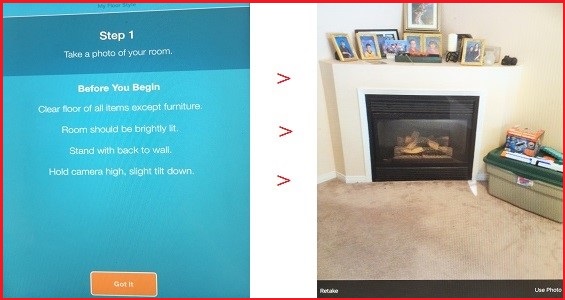
Step 1: Take a picture of your room.
Use My Floor Style to take a photo of your room or use an existing pic from your tablet.
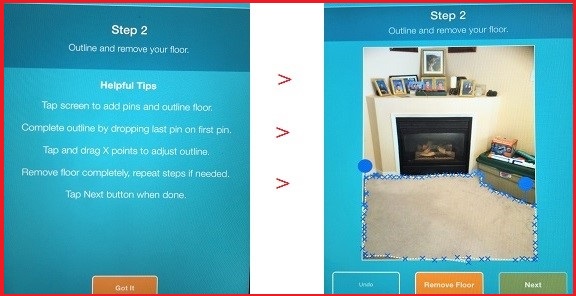
Step 2: Outline and remove your floor.
Remove the floor in your room photo by dropping pins to outline the flooring surface. These pins appear as a little x on your screen and each x is connected by the dots. 🙂
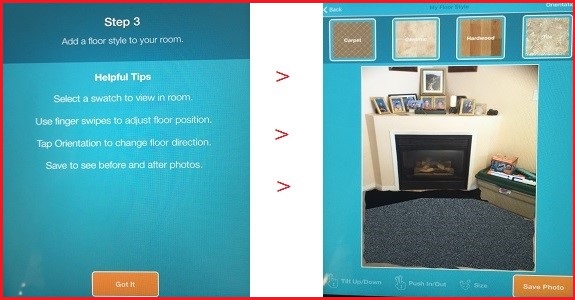
Step 3: Add a floor style to your room.
Select a flooring category and choose from a wide range of swatches to drop the floor into your photo. You can then adjust depth, orientation and more with a simple tap. It’s kind of fun!
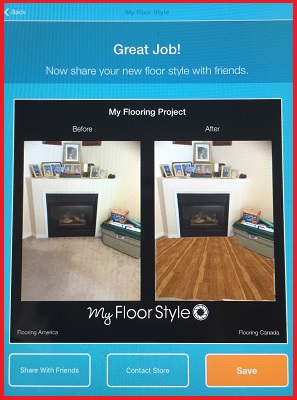
Step 4: Save and share your project.
When you’re finished, view before and after photos to compare, save your project to reference later or even share your photo via email, text or social media to get your friends and family’s opinion of your choices. How easy is that?!
Aside from the many beautiful and trendy flooring options you can see in the My Floor Style app, Flooring America/Flooring Canada has a new water-proof luxury vinyl plank flooring called Downs H20. This gorgeous vinyl looks so much like wood, but allows you to have it in places where water is very likely to end up on it. Whether you are redoing your kitchen this summer, sprucing up a bathroom or updating your laundry room, Downs H20 is a fantastic option. Pretty, isn’t it?
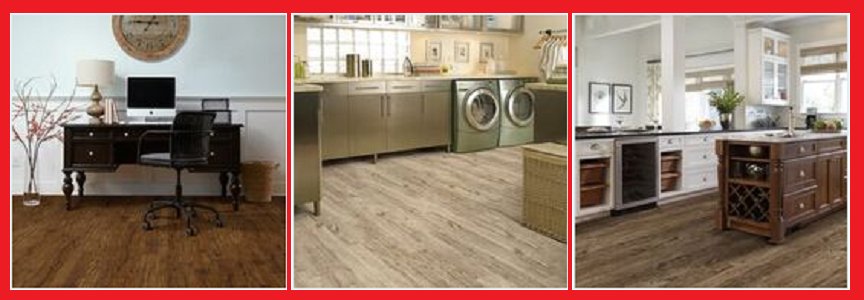
So this Spring when you are trying to imagine what some new carpet will look like in your bedroom or how well new hardwood floors will match your dining room table, give the My Floor Style app a try. Check out the social media accounts for Flooring America/Flooring Canada to keep up to date on new options to try and places where their beautiful products can be found.
Flooring America on Facebook, Twitter and Instagram
Flooring Canada on Facebook, Twitter and Instagram
Which do you prefer to have in your family living spaces, like the den or family room: hardwood or carpet?
FT&PD
Suz
Disclosure: This post was sponsored by Flooring America/Flooring Canada, but all opinions are my own. Trust me, you will love the My Floor Style app. 🙂
This is brilliant!!!!!! I’m not looking to do my floors, but my parents are and this would be most useful for them!
Your timing is wonderful. We are looking at replacing the kitchen flooring this summer. This will be an enormous help. Thank you for posting.
Great app! Wish I had it a couple of years ago! We are updating our Laundry Room this summer. Thanks for mentioning the Downs H20 water proof flooring, perfect solution for us!
That certainly is a great app and let’s you actually see what different flooring would look like, making it easier to pick what suits your style and the room itself 🙂
Wow amazing app. I’m going to have to check it out, I love the looks of the Downs H20, very nice!!
This app looks amazing! I’m not quite ready to replace the flooring in our house, but when I do I am going to try this!
omg this is amazing!! I am so happy I saw this post. My husband and I want to get hardwood for our bedroom in June but I had no idea what kind of floor I wanted to go with as I didn’t know what would look best and now I can have the help of this app to guide me 🙂 thanks for sharing!!
What a cool way to find the perfect flooring for each room in your house! I love it. It’s like sims only it’s your actual flooring, lol. Thanks for sharing this cool app, I will definitely try it out.
I am loving this idea and how easy it is to use. I’m actually thinking of redoing my kitchen and have been worried about not doing a good job but this app makes it flawless.
Wow what a cool app. I love how technology makes everything ten times easier for us…even making decisions!
It really helps to simulate the different flooring using a computer. You get to visualize how it looks like and pick the best option.
This is quite a smart app! It’s so much better than just imagining the results of flooring 😀
This kind of app is really very practical. There should be something like this for walls as well. We need to see how it looks before we buy the carpet or the paneling or the paint.
This is a great app! I love playing those house building/house designing computer games. It gets my adrenaline pumping after accomplishing a great result. Much more so if this is something you can actually do to your home. 🙂
Looks like a good app. Somehow I’ve never been a big fab of carpets. Maintenance is such a pain. Tiles or plywood is better anyday..
Ohh I like it!! That takes the guesswork right out. It’s great!
This is a brilliant way to experiment and find which one will suit best for your home.
We recently renovated our home. Didn’t know about this app before. Will definitely try out and recommend to my friends.
When we finally get our own home, will definitely keep this app in mind. I definitely want a carpeted living room/tv room though, and probably wood planks/tiles in the kitchen to make cleaning up easy.
The look of the floor matters, but so does the quality and water-absorbing qualities! My mum bought the wrong type of marble for the house, and ever since then, every floor mopping becomes really tedious as there will be stains!
this is such an amazing idea! i love it and is very useful
LOL Love it!! There literally is almost an APP for everything!!
I actually prefer the vinyl flooring because it tends be more resistant. It’s the material that’s more multipurpose, and great even for spills.
Really brilliant! Indeed, innovations in tech is applicable in diverse forms. Loving how it could suggest decisions and makes life easier for us. What a cool app!!!
I desperately need to change my old gross carpets – I had never even heard of this app before – looks great! I’m definitely going to check this out 🙂
Pretty cool app, I’ll try it out for sure!
What an awesome app! Checking it out.
what a great concept and fun to use
I’m installing new flooring in my kitchen. Thanks for the advice about how you can use an app to help you find a floor color that will match the room. Another thing to consider is to get waterproof flooring that will last for a long time.